A cloud kitchen ordering website of your own
A cloud kitchen has no dining room and no walk-ins, so every order arrives through a screen. Zovi gives you an ordering website of your own, so some of those orders come straight to your kitchen.
- Your own ordering website, with pickup and delivery.
- Delivery by your own riders, assigned from the app.
- Guests follow each order from placed to completed.
- Payments go to your own Razorpay account.
Zovi gives a cloud kitchen its own ordering website. Guests order for pickup or delivery and pay online or in cash. Your own riders deliver, and Zovi does not provide a delivery fleet. Guests pay into your own Razorpay account.
Where a cloud kitchen gets stuck.
Every guest belongs to someone else
When all orders come through listings, the guest knows the listing, not your kitchen. Nobody can order from you again unless the listing shows you.
A share of every order
A cloud kitchen sells only through screens, so a commission is charged on nearly every sale. It is the biggest cost you do not control.
Packing and timing under pressure
Orders arrive in bursts at lunch and dinner. A missed ticket or a late rider turns one bad delivery into a bad review.
Delivery you cannot see
If the rider belongs to someone else, you do not know where the order is until the guest calls. Your own rider is one you can speak to.
How an order moves through your kitchen.
A guest orders on your websiteguest
The guest picks pickup or delivery, then pays online or in cash.
You accept the orderyou
The order shows in Zovi Business. You accept it, and the guest sees the new step.
The kitchen cooks and packsyou
You mark the order as being prepared, then ready, so the guest knows how far along it is.
Your rider takes it outyou
You assign one of your own riders to the delivery order. For pickup, the guest collects it.
The order is completedguest
The guest sees the order completed. The payment is already in your own Razorpay account.
What Zovi gives a cloud kitchen.
Your own ordering site
Your kitchen gets its own website on its own address, such as yourname.zovi.food. The Photo first template puts your food in front.
Pickup and delivery
Guests can order for pickup or delivery from your website, and pay online or in cash. Guests who live close by can collect the order themselves.
Your own riders
Delivery is done by your own riders. Zovi does not provide a delivery fleet. You assign a rider to each accepted delivery order.
Order steps the guest can see
Guests follow each order from placed to completed. A guest does not have to call to ask where the food is.
Your own Razorpay account
Payments go to your own Razorpay account, which charges its own payment fees. Zovi takes no commission on orders.
Works with Zentaro Serve
If you use Zentaro Serve, orders from your Zovi website arrive in Serve as Zovi Store orders, with a badge.
One dinner service at an example kitchen.
A made-up kitchen with two own riders. The table shows what the kitchen does and what the guest sees at each step.
| The kitchen does | The guest sees |
|---|---|
| Accepts the order in Zovi Business. | Order placed, then accepted. |
| Marks the order as being prepared. | Being prepared. |
| Marks the order ready and assigns an own rider. | Ready. |
| The rider picks the order up. | On the way, with a map after pickup. |
| The rider hands it over. | Completed. |
An example, not a real kitchen. The map appears only after the rider picks the order up. Delivery needs your own riders and the delivery switch for your market.
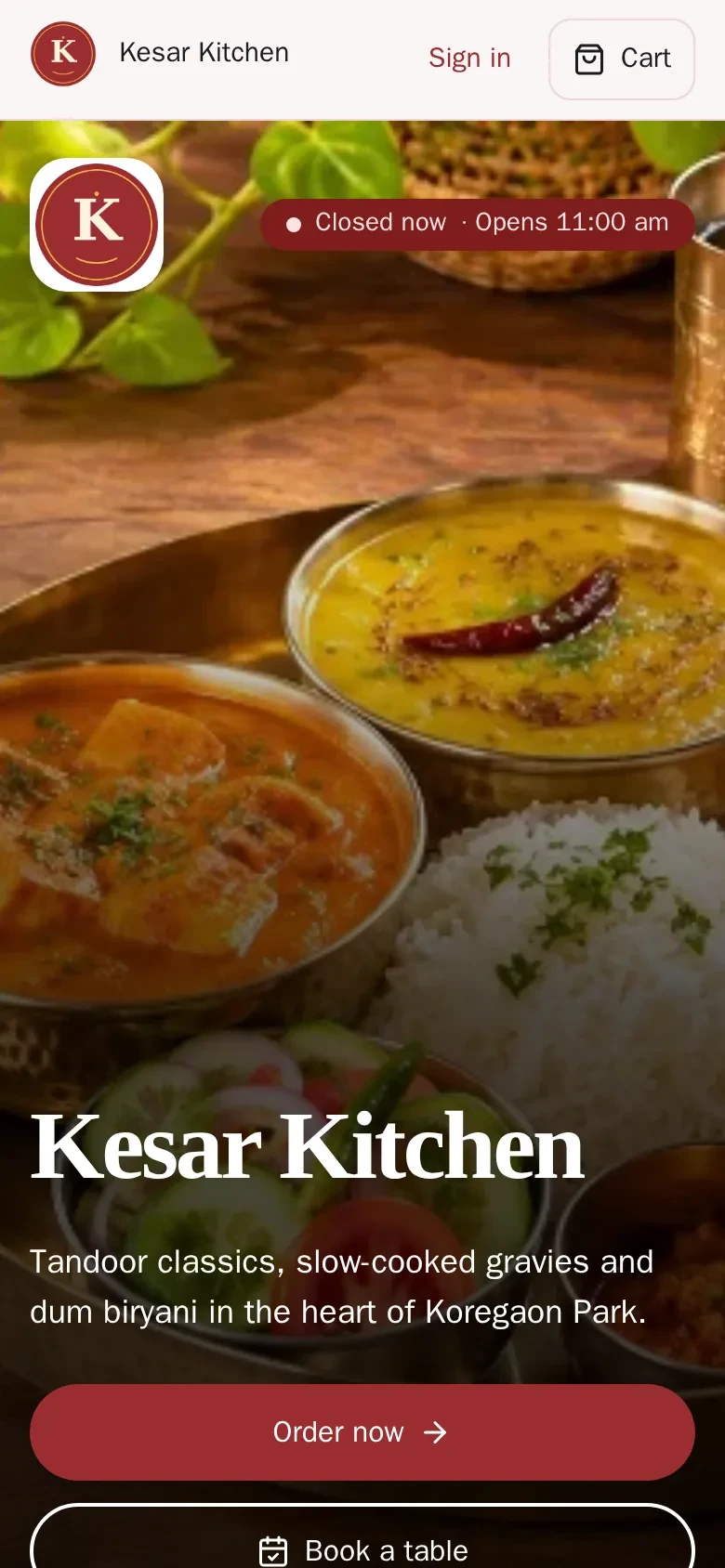
Put your food first, then the Order now button.
The Photo first template fills the first screen with your food and puts the order buttons right below it. It suits a kitchen that is known for its pictures.
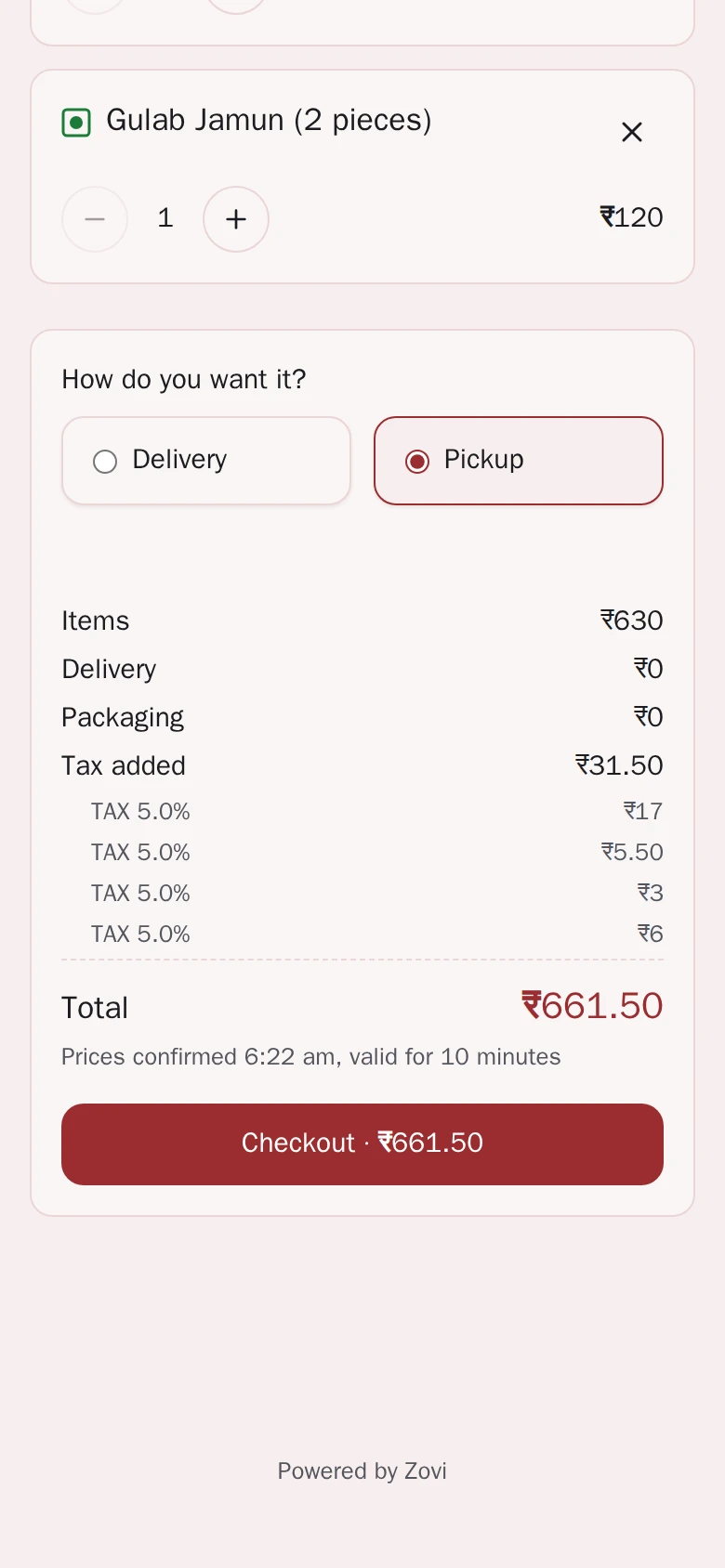
- Pickup or delivery is chosen in the cart.
- The cart shows pickup or delivery, the tax and a Checkout button.
App screens with sample data
Good to know
- Delivery is done by your own riders only. Zovi does not provide a delivery fleet or third-party couriers.
- Delivery depends on the market switch for delivery. It is off until your market turns it on.
- Zovi does not replace the listings you already use. It adds a website of your own beside them.
- Zovi Business is for kitchens with no POS. A kitchen on Zentaro Serve gets its menu and prices from Serve.
Common questions.
Who delivers the orders of a cloud kitchen?
Delivery is done by your own riders. Zovi does not provide a delivery fleet. You assign a rider to each accepted delivery order.
Can a cloud kitchen use Zovi along with other listings?
Yes. Zovi gives your kitchen a website of its own. It does not stop you from using other listings beside it.
Can guests see where their order is?
Guests follow each order from placed to completed. For a delivery, a map appears once the rider has picked the order up.
Where does the money from a kitchen order go?
Payments go to your own Razorpay account, which charges its own payment fees. Zovi takes no commission on orders.
I use Zentaro Serve. Do I still need Zovi Business?
No. If you use Zentaro Serve, orders from your Zovi website arrive in Serve as Zovi Store orders, with a badge. Your menu and prices come from Serve.
No commission on orders.
Zovi takes no commission on orders.
Guests pay your business directly. The food money is yours.
Your own Razorpay account.
Payments go to your own Razorpay account, which charges its own payment fees.
Tell us about your cloud kitchens.
Zovi is launching in 2027. Tell us what you run today and we will get in touch.
Last updated: